HTML2MP4 / EDITABLE MOTION
HTML animation to video
Keep the motion. Change the medium.
Export HTML, SVG and time-driven animation as video. Start with an SVG flow diagram that turns a process into a short visual story.
Explore before signing in. New accounts get 3 free credits.
EDITABLE INPUT
See the source. Make it yours.
Load the source into the form below, change the content, and keep the animation structure. Nothing is submitted until you create a video.
View the example HTML ↗WHAT TO CUSTOMIZE
- Your headline, labels and on-screen copy
- Brand colors and the composition’s visual details
- Timing that fits the source animation and your chosen length
- 01Start from an SVG composition
- 02Edit labels, paths and timing
- 03Render the animation to MP4
YOUR TURN
Bring your own source. Or borrow ours.
Edit the source or describe changes. Notes are applied during generation; the source preview shows the current code.
Pick a sample to try or tweak
Examples / Templates
Prefer a curated motion layout instead of pasting your own CSS/SVG/GSAP? These official packs open on the Templates tab / video templates with the pack selected. Paste-your-own animated HTML (or Try an SVG sample) on this page stays the primary path.
More packs on Video templates. GSAP-first notes: GSAP to MP4. CSS @keyframes: CSS animation to video. SVG → MP4 intent: SVG to MP4.
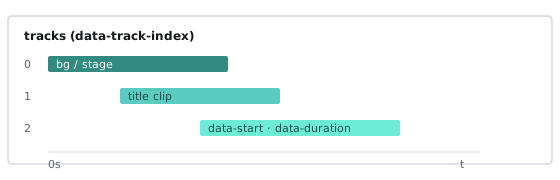
How to turn HTML animation into an MP4
- Fill the form above — Sign in when you create (or the HTML form). New accounts get 3 free credits to try a render (not unlimited free usage).
- Paste your animated HTML — A page with CSS, SVG, or GSAP motion, or a HyperFrames composition with data attributes and a seekable timeline. Or click Try an SVG sample for a minimal SVG + CSS keyframes starter (fill only — it never auto-submits). Pure CSS starters also live on CSS animation to video. Optional notes: “keep easing, export 9:16, end on CTA.”
- Pick format and length — 16:9, 1:1, 4:5, or 9:16; about 6–30 seconds. Submit; when the job finishes, download the H.264 MP4.
Need the broader methods guide? See HTML to MP4. General convert intent: convert HTML to video. Trying before packs: HTML to MP4 online free. Pipeline and export details: render HTML to MP4. Batch / automation intent: programmatic video from HTML.
Who this page is for
People searching html animation to video (or svg to mp4 / svg animation to video) already have motion in the browser — hero loops, SVG icons, product UI transitions, GSAP timelines — and need a file they can upload to ads, social, or a deck. They are not looking for a generic “paste any static page” explainer; they care whether timing survives the export.
- Motion and front-end designers — Ship CSS, SVG, or GSAP mock motion as MP4 without re-building in After Effects.
- Growth and product marketers — Turn landing-page animations into Reels/Shorts cuts that match the live site.
- Agencies — Deliver client HTML animations as video without recording every laptop at different frame rates.
- HyperFrames authors — Export compositions you already built with seekable timelines; see the HyperFrames tutorial.
No animation yet? Start from a brief with prompt to video, a live URL with website to video, or brand lines with brand kit video. Engine overview: what is HyperFrames?
SVG to MP4 / SVG animation to video
Searching svg to mp4 or svg animation to video? You usually already have an animated <svg> — logo draws, icon pulses, stroke reveals — and need a silent MP4 for ads, social, or a deck. Use the form above (or click Try an SVG sample) instead of opening a separate SVG-only URL: Html2MP4 treats SVG as HTML animation source on this same page.
- Who this intent fits — Designers shipping SVG logo/icon motion; marketers who need a short loop from an existing SVG; front-end folks who already animate with CSS on SVG elements.
- Server frame-accurate render vs browser-local capture — Some HTML/SVG→video tools capture inside the browser for short silent clips. Html2MP4 seeks a known timeline on the server and encodes with FFmpeg, so timing is not tied to your laptop GPU or tab focus. That is the same engine as CSS/GSAP HTML on this site.
- Honest boundaries — Best for short silent loops with seekable motion (CSS
@keyframeson SVG attributes, or light deterministic SMIL). Complex SMIL, heavy filters, infinite non-seekable loops, and pointer-only demos may look wrong or fail. Prefer time-driven CSS on SVG; keep duration in the HTML tab range (~6–30s). - Where CSS vs SVG vs GSAP live — Pure DOM/text @keyframes: CSS animation to video. Seekable GSAP timelines: GSAP to MP4. General HTML methods: HTML to MP4. This page hosts the SVG Try sample and the broader animation narrative.
Ready to try? Jump to the HTML form, click Try an SVG sample, pick format/length, then create.
HTML animation render vs screen recording
Screen recording a tab is the default workaround: open the page, hit record, hope the GPU keeps up. That path is fine for a one-off demo. It fails for batch ads, consistent brand timing, and any animation that must look identical on every export.
- Frame-accurate server render — Html2MP4 uses HyperFrames + FFmpeg so each frame samples a known time on the timeline.
- Stable aspect ratios — You choose 16:9 / 1:1 / 4:5 / 9:16 up front instead of cropping a 1440p desktop capture later.
- No “laptop speed” variance — Recording on a slow machine drops frames; seekable render does not depend on your fan noise.
- Honest limits — Hover-only interactions, infinite non-seekable loops, and login-walled pages are harder. Prefer timelines driven by time, not by mouse position.
If you care about the pipeline itself (checks, FFmpeg, why a frame looks wrong), use the sibling render HTML to MP4 page and local tips in HyperFrames render troubleshooting. GSAP seek details: GSAP to MP4.
What you get
Each successful job returns a downloadable H.264 MP4 of your animated HTML. Before create you choose:
- Landscape 16:9 — YouTube, site embeds, decks.
- Square 1:1 — Feed posts.
- Portrait 4:5 — Instagram feed.
- Vertical 9:16 — Reels, Stories, Shorts, TikTok.
Cost is 1 credit per successful render. System failures return the credit. Html2MP4 is not a timeline NLE and not a browser recorder: you submit HTML/SVG/animation source, the server renders, you download. Packs live on Pricing — this page stays focused on animation export (including SVG → MP4), not selling plans.
Tips for clean HTML animation exports
- Prefer seekable motion — HyperFrames data attributes and time-based GSAP/CSS/SVG beats pointer-driven demos. Tutorial: HyperFrames tutorial. SVG searchers: start from SVG to MP4.
- Paste complete styles — Missing CSS makes the agent guess; include the fonts and keyframes the animation needs.
- Declare the end state — Notes like “hold final CTA 1s” reduce awkward cutoffs.
- Match the channel — Design 9:16 compositions for Reels; do not stretch a 16:9 hero and hope.
- One job at a time while learning — Judge the first export before batching variants.
- Local CLI option — Unlimited experiments on your machine: install HyperFrames. Use the form above when you want zero local FFmpeg.
Questions? Email contact@html2mp4.com.
Common questions
What does HTML animation to video mean on Html2MP4?
You paste animated HTML — CSS keyframes, SVG motion, GSAP-driven timelines, or a HyperFrames composition — on this page. Html2MP4 renders it frame-by-frame into a downloadable H.264 MP4. The goal is a shareable clip that matches the animation timing, not a live browser screen capture.
Why is this better than screen recording an HTML animation?
Screen recording depends on your machine’s frame rate, window size, and CPU load. Dropped frames and uneven timing are common. HyperFrames seekable render samples the timeline at known frame times, so motion stays consistent across exports.
Do CSS, SVG, and GSAP animations work, or only HyperFrames?
HyperFrames compositions with seekable timelines are the most reliable. Plain CSS/SVG/GSAP HTML often works when the motion can be driven by time; the hosted HTML agent can adapt layouts. Non-seekable loops or pointer-only interactions are harder. For GSAP-first notes see /gsap-to-mp4/; for @keyframes-first see /css-animation-to-video/; for SVG → MP4 intent see #svg-to-mp4 on this page.
Can I export SVG or SMIL animation to MP4?
Yes for short, seekable SVG motion — typically SVG markup driven by CSS @keyframes (stroke-dashoffset, opacity, transform). Click Try an SVG sample for a minimal starter (fill only, never auto-submits). Light SMIL can work when timing is deterministic; complex SMIL, heavy filters, or free-running loops may be unstable. Prefer CSS-timed SVG over pointer-only interaction. See #svg-to-mp4.
How is SVG → MP4 different from pure CSS or GSAP on Html2MP4?
Same hosted HTML → MP4 engine. SVG intent means your visuals live in <svg> (icons, rings, path draws) while CSS or GSAP still drives time. Pure CSS pages lean on DOM/text @keyframes (/css-animation-to-video/); GSAP pages lean on seekable timelines (/gsap-to-mp4/). This page covers the broader animation stack and hosts the SVG Try sample.
How is this different from browser-local HTML-to-video capture tools?
Some tools record or capture inside your browser for short silent clips (often ~10s caps). Html2MP4 renders on the server with a seekable timeline and FFmpeg, so timing does not depend on your laptop GPU. Tradeoff: you use credits and wait for a job; you get consistent aspect ratios and frame-accurate exports instead of a local MediaRecorder-style capture.
How do I export HTML animation to MP4 online?
Paste your animated page or composition (or click Try an SVG sample for a short SVG+CSS starter — fill only, never auto-submits), add notes such as aspect ratio and CTA, pick length, then create. When the job finishes, download the MP4. New accounts get 3 free credits to try. Pure CSS starters also live on /css-animation-to-video/.
What formats and lengths can I export?
Landscape 16:9, square 1:1, portrait 4:5, and vertical 9:16, about 6–30 seconds for the HTML tab.
How is this page different from convert HTML to video or render HTML to MP4?
Same hosted HTML → MP4 product. This page focuses on animation intent (CSS/SVG/GSAP/HyperFrames motion vs screen recording). Convert HTML to video is the general convert intent; render HTML to MP4 covers the render pipeline and export reliability. GSAP details live on /gsap-to-mp4/; SVG animation examples are covered in #svg-to-mp4 here.
What if my animation looks wrong after render?
Prefer seekable timelines, paste complete CSS (and inline SVG), and note the intended end frame. For local CLI issues see HyperFrames render troubleshooting. Hosted job failures return the credit automatically; email contact@html2mp4.com if something looks wrong.
Can I start from a template instead of pasting animated HTML?
Yes. Official packs such as CSS text reveal and HTML feature grid open from Examples / Templates on this page or /video-templates/ (Templates tab) with the pack selected. Pasting your own CSS/SVG/GSAP/HyperFrames HTML on this page remains the primary animation-export path.
Related guides
- SVG to MP4 — SVG animation → video on this page
- CSS animation to video — @keyframes / WAAPI → MP4
- GSAP to MP4 — seekable timeline export
- Render HTML to MP4 — frame-accurate export pipeline
- Programmatic video from HTML — batch and automation
- Convert HTML to video — convert intent
- HTML to MP4 — methods guide
- HTML to MP4 online free — try with signup credits
- HyperFrames tutorial — seekable compositions
- What is HyperFrames?
- HyperFrames render troubleshooting
- Video templates — official packs
- HTML to MP4 homepage