
Home / Tutorial
HyperFrames tutorial: your first HTML to MP4
This HyperFrames tutorial follows the official CLI. Commands match the project README; check upstream docs if a flag changes.
1. Requirements
- Node.js 22 or newer (
node -v) - FFmpeg on your PATH (
ffmpeg -version) - Chrome is downloaded automatically by Puppeteer
2. Install and scaffold
npm install -g hyperframes   # optional; npx works too
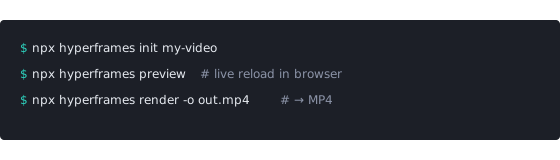
npx hyperframes init my-video
cd my-video
3. Write the composition
Edit index.html. The root element declares size and id; children with class clip get data-start, data-duration and data-track-index. Register a paused GSAP timeline on window.__timelines so the renderer can seek it.
<div id="stage" data-composition-id="launch" data-start="0"
     data-width="1920" data-height="1080">
  <h1 id="title" class="clip" data-start="1" data-duration="4"
      data-track-index="1">Launch day</h1>
  <script src="https://cdn.jsdelivr.net/npm/gsap@3/dist/gsap.min.js"></script>
  <script>
    const tl = gsap.timeline({ paused: true });
    tl.from("#title", { opacity: 0, y: 40, duration: 0.8 }, 1);
    window.__timelines = window.__timelines || {};
    window.__timelines.launch = tl;
  </script>
</div>
4. Preview
npx hyperframes preview
Opens a browser preview with live reload so you can tweak timing before a full render.
5. Render to MP4
npx hyperframes render
The positional argument is the project directory (not a single file). Use -c to point at a specific composition and -o for the output path, for example -o output.mp4.
Troubleshooting
- Animation doesn’t move in the output — it must be seekable (paused timeline registered), not driven by
setTimeoutor user interaction. - Fonts look wrong — bundle fonts locally so they load before capture.
- Remote assets missing — prefer local files inside the project.
- Node errors — confirm Node 22+.
New to the tool? Read what HyperFrames is first. Comparing stacks? See HyperFrames alternatives. Other conversion paths: convert HTML to MP4.