
Home / What is HyperFrames
What is HyperFrames?
HyperFrames is an open-source framework for turning HTML, CSS, media and seekable animations into deterministic MP4 videos. It is developed by HeyGen, licensed Apache-2.0, and described by the project as “Write HTML. Render video. Built for agents.”
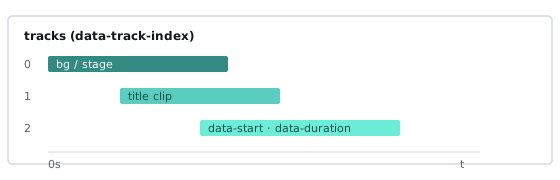
How HyperFrames works
You define a video as an HTML page. Data attributes set when each element starts, how long it lasts and which track it sits on. Animation comes from any seekable runtime — GSAP, CSS animations, Lottie, Three.js, Anime.js, WAAPI or a custom adapter. The renderer opens the page in headless Chrome, seeks each exact frame, captures it and encodes the result with FFmpeg.
<div id="stage" data-composition-id="launch" data-start="0"
     data-width="1920" data-height="1080">
  <h1 id="title" class="clip" data-start="1" data-duration="4"
      data-track-index="1">Launch day</h1>
  <script src="https://cdn.jsdelivr.net/npm/gsap@3/dist/gsap.min.js"></script>
  <script>
    const tl = gsap.timeline({ paused: true });
    tl.from("#title", { opacity: 0, y: 40, duration: 0.8 }, 1);
    window.__timelines = window.__timelines || {};
    window.__timelines.launch = tl;
  </script>
</div>
Key features
- HTML-native — no React requirement, no proprietary timeline format, no build step.
- Deterministic — same input, same frames, same output.
- Agent-friendly — non-interactive CLI; the project documents “agent skills” so coding agents can author videos.
- Catalog — reusable blocks for transitions, overlays, captions, charts and effects (HeyGen docs mention 150+).
- Formats — MP4, MOV, WebM, GIF, PNG sequence (per HeyGen documentation).
- Where it renders — locally, Docker, AWS Lambda, or HeyGen’s Cloud Rendering API.
The HyperFrames stack
- CLI — scaffold, preview, lint, inspect, render
- Core / Engine / Producer — parse compositions, drive Chrome, encode, mix audio
- Studio — browser surface for previewing and editing
- hyperframes.dev — community playground for sharing and rendering
Good use cases
- Product launch and changelog videos
- Data-driven or personalized videos at scale (one template, many variables)
- Social clips, captions, lower thirds
- Videos authored end-to-end by an AI coding agent
This page is an independent overview. For hands-on steps see the HyperFrames tutorial. To weigh other tools, read HyperFrames alternatives. Broader methods are in how to convert HTML to MP4.