
Home / Alternatives
HyperFrames alternatives compared
Looking for HyperFrames alternatives? Code-driven video tools differ mainly in how you author (HTML vs React vs canvas) and licensing. Use the table below as a starting map, then read each project’s license before shipping.
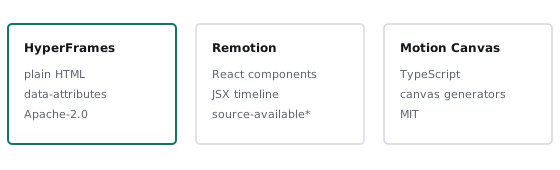
Comparison table
| Tool | Authoring | License | Best for |
|---|---|---|---|
| HyperFrames | HTML + data attributes; any seekable animation lib | Apache-2.0 | Agents, templates, no-React pipelines |
| Remotion | React components | Source-available; companies above a size threshold need a paid license | React teams, mature ecosystem, Lambda rendering |
| Revideo | TypeScript (fork of Motion Canvas) | MIT | Programmatic video via API |
| Motion Canvas | TypeScript generators, canvas | MIT | Animated explainers with editor |
| Editly | JSON/JS spec, FFmpeg-based | MIT | Simple slideshows and concatenation |
| Puppeteer / Playwright + FFmpeg (DIY) | Any page, screen recording | OSS | One-off captures; timing is not deterministic |
Licensing summaries are simplified — always read each project’s license before commercial use.
HyperFrames vs Remotion
Both render web tech to video with headless Chrome. Remotion uses React components and has a commercial license for larger companies; HyperFrames uses plain HTML with no build step and is Apache-2.0 with no per-render fees according to the project README. If your team lives in React, Remotion’s ecosystem is mature. If an AI agent or template system generates the video, HyperFrames’ plain-HTML format is simpler to emit.
When to pick something else
- Need a visual editor for non-developers → a hosted video editor.
- Just stitching clips or images → Editly or raw FFmpeg.
- Quick screen capture of a live site → DIY Puppeteer recording (accept frame drops).
To try HyperFrames hands-on, follow the HyperFrames tutorial. For a product overview see what HyperFrames is. Practical conversion routes: how to convert HTML to MP4.