
Independent guide. Not affiliated with HeyGen.
HyperFrames guide for HTML to MP4
HyperFrames is HeyGen’s open-source framework that turns HTML, CSS and seekable animations into deterministic MP4 video. This site covers what it is, how to run the CLI, how it compares to Remotion and others, and practical ways to convert HTML to MP4.
Guides by search intent
One deep page per question. Pick what you came for.
-
what is
What is HyperFrames?
Plain-language overview of HeyGen’s HTML-to-video framework, features and stack.
-
tutorial
HyperFrames tutorial
Install Node 22 and FFmpeg, init a project, preview, then render your first MP4.
-
alternatives
HyperFrames alternatives
Compare with Remotion, Revideo, Motion Canvas, Editly and DIY Puppeteer+FFmpeg.
-
html to mp4
Convert HTML to MP4
CLI, cloud, screen recording and PNG+FFmpeg — when to use each method.
-
faq
HyperFrames FAQ
License, requirements, animation libs, output formats and cloud rendering.
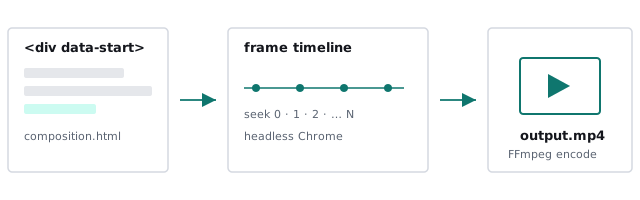
How HyperFrames turns HTML into video
Three steps from composition file to MP4.
-
01
HTML is the timeline
A composition is an HTML file. Attributes like
data-start,data-durationanddata-track-indexplace clips on tracks. -
02
Seek every frame
Headless Chrome is seeked frame-by-frame instead of recording live playback, so slow machines don’t drop frames.
-
03
Encode with FFmpeg
Captured frames (plus audio mixing) become MP4. Same input, same output — useful for CI and batch jobs.
# from the official README
npx hyperframes init my-video
cd my-video
npx hyperframes preview  # live reload
npx hyperframes render   # → MP4
Common questions
What is HyperFrames?
HyperFrames is an open-source (Apache-2.0) framework from HeyGen that turns HTML, CSS, JavaScript, media and seekable animations into deterministic MP4 video. Compositions are plain HTML files with data attributes for timing and tracks. See What is HyperFrames?
Is HyperFrames free?
Yes. The framework on GitHub (heygen-com/hyperframes) is Apache-2.0. HeyGen separately offers a paid Cloud Rendering API. Full answers in the FAQ.
How do I convert HTML to MP4 with HyperFrames?
Run npx hyperframes init my-video, edit index.html, preview, then npx hyperframes render. Step-by-step in the HyperFrames tutorial.