
Home / HTML to MP4
How to convert HTML to MP4
Browsers don’t ship a “Save as MP4” button. If you need to convert HTML to MP4, these are the practical routes — from frame-accurate HyperFrames renders to quick screen captures.
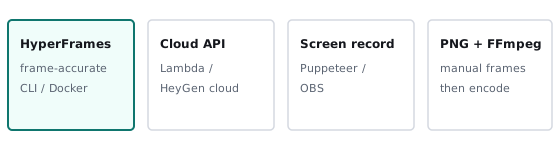
1. HyperFrames (deterministic, free)
Author the page as a HyperFrames composition and run npx hyperframes render. The engine seeks headless Chrome frame-by-frame and encodes with FFmpeg, so timing stays stable across machines. Best quality for animated HTML. Walkthrough: HyperFrames tutorial. Background: what is HyperFrames?
2. Cloud rendering
When you need scale without keeping a GPU/CPU box warm, render HyperFrames projects on AWS Lambda (supported by the project) or HeyGen’s Cloud Rendering API. You still author in HTML; the cloud only runs the capture and encode steps.
3. Screen-record a page
Puppeteer or Playwright video recording, or OBS pointed at a browser window. Fast to set up, but timing depends on machine speed and frames can drop. Fine for demos; weak for batch or CI where you need identical pixels every run.
4. Screenshots plus FFmpeg
Capture a PNG sequence (manually stepped or scripted), then encode:
ffmpeg -framerate 30 -i frame_%04d.png -pix_fmt yuv420p out.mp4
Works for static slides or animations you control yourself. You own every frame, but you also own the seek/sync logic that HyperFrames already provides.
Online HTML to MP4 tools
Some third-party sites offer “paste HTML, get MP4.” Treat them carefully: uploads may leave your content on someone else’s servers, and quality varies. We plan a browser-based converter on html2mp4.com later; until then the HyperFrames CLI is the recommended path for developers.
Which method should you pick?
- Repeatable product or agent-generated video → HyperFrames CLI or cloud.
- One-off demo of a live site → screen recording.
- Slideshow with no complex animation → PNG sequence + FFmpeg or Editly (see alternatives).