HTML2MP4 / EDITABLE MOTION
HTML to MP4 online free
Try a real export first.
Try HTML to MP4 with 3 signup credits. Explore a short animation before signing in, then use a credit to create your own version.
Explore before signing in. New accounts get 3 free credits.
EDITABLE INPUT
See the source. Make it yours.
Load the source into the form below, change the content, and keep the animation structure. Nothing is submitted until you create a video.
View the example HTML ↗WHAT TO CUSTOMIZE
- Your headline, labels and on-screen copy
- Brand colors and the composition’s visual details
- Timing that fits the source animation and your chosen length
- 01Explore the free sample
- 02Sign up for 3 credits
- 03Create a six-second export
YOUR TURN
Bring your own source. Or borrow ours.
Edit the source or describe changes. Notes are applied during generation; the source preview shows the current code.
Pick a sample to try or tweak
Examples / Templates
No HTML ready yet? Spend your 3 free signup credits on an official pack — cards open the Templates tab / video templates with that pack selected. Or paste your own HTML on this page after sign-in (or on the HTML form). Each successful render uses 1 credit (trial credits count). Free = 3 signup credits to try — not unlimited free usage.
 Product launchBrand, headline, feature beats, CTA — via Templates (signup credit OK).
 Sale promoOffer, deadline, shop CTA — via Templates.
 Event inviteDate, venue, RSVP — via Templates.
Full library: Video templates. Free-form brief: Prompt to video.
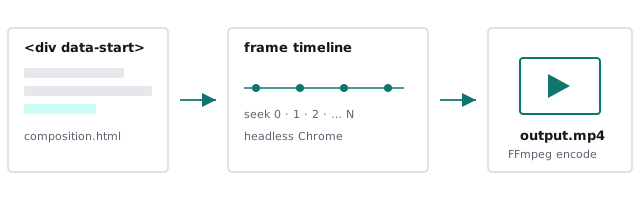
What “free” means on Html2MP4
People searching html to mp4 online free usually want to test the tool before paying. On Html2MP4 that means:
- Free account — Sign in with Google or an email code.
- Free signup credits — New accounts get 3 free credits to run successful renders (enough to try the HTML flow a few times).
- Not unlimited — Extra jobs need credit packs. We do not promise unlimited free renders, forever-free commercial use, or watermark-free mass export without credits.
After you use the trial credits, the form above shows No credits left and points you to Pricing for one-time packs. No subscription is required. Same engine details live on HTML to MP4 and the convert-intent sibling convert HTML to video.
How to try HTML to MP4 free
- Create an account — Sign in when you create (or open the HTML form). Your 3 free credits appear on the account.
- Paste HTML — Use the form above after sign-in. A full page or HyperFrames composition. Optional notes: aspect ratio, CTA, what to keep.
- Render and download — Pick 16:9 / 1:1 / 4:5 / 9:16 and about 6–30 seconds. When the job succeeds, download the MP4. That spend uses 1 credit.
Prefer a URL, a prompt, or brand kit instead of paste-HTML? See website to video, prompt to video, and brand kit video — trial credit works the same way across create modes. Prefer a curated layout? Open a pack in Examples / Templates.
Who this page is for
- Evaluators — Confirm quality before buying packs.
- Students and indie makers — Run a first HTML→MP4 without a card.
- Teams comparing tools — Check frame-accurate HyperFrames output vs screen recording.
If you already know you need volume, skip straight to Pricing after the trial. For local free CLI rendering (your own machine), HyperFrames is open source — see install and what is HyperFrames? — that path is separate from the hosted free credit.
Quick start checklist
Use your signup credit on paste-HTML or Templates — same free-trial rules:
- Sign up — Create an account (Google or email code). New accounts get 3 free credits to try.
- Paste path: use the form above on this page (or the HTML form) → paste a full page or HyperFrames composition → pick format and length → create.
- Template path: open a pack in Examples / Templates or Video templates → fill the short field schema → enqueue.
- Success spends 1 credit (your free trial credit counts). System failure returns the credit automatically. There is no unlimited free usage.
Want full local control instead? See online vs local CLI.
Online Html2MP4 vs local HyperFrames CLI
Trying HTML to MP4 online free with signup credits means you never install Node or FFmpeg on your laptop — Html2MP4 workers render the job for you. The open-source HyperFrames CLI still fits when you want local or CI control on your own machine (see install and the tutorial). This page is the try-before-buy path: 3 free credits to judge quality, then one-time packs on Pricing if you stay hosted. Broader methods (cloud, DIY screen record): sibling HTML to MP4. Convert-intent twin: convert HTML to video.
What the free trial render includes
- Server-side HyperFrames render → H.264 MP4 download (same engine whether you paste HTML or pick a Templates pack).
- Aspect ratios: 16:9, 1:1, 4:5, 9:16 — pick the channel before you spend the trial credit.
- Length band about 6–30 seconds for the HTML tab; Templates packs use the same credit rule.
- If the system fails to produce a video, the credit is returned automatically.
- No submit-time preview and no public REST API for video jobs — you enqueue, wait, then download.
The 3 free credits are a fair trial of the hosted product. It is not a forever-free SaaS plan, not unlimited free commercial export, and not a watermark-free mass-download loophole. Need more after the trial? Buy one-time packs on Pricing — no subscription required. Questions: contact@html2mp4.com.
Tips before you spend free credits
- Paste something you care about — Use a real composition so you can judge quality, not a blank test. Or start from a pack in Examples / Templates if you do not have HTML ready.
- Add format notes — Say 9:16 or 16:9 up front so the trial matches the channel you ship to.
- Prefer seekable HTML — HyperFrames compositions convert more reliably than non-seekable CSS loops. See the HyperFrames tutorial.
- One active job — Wait for the trial job to finish before starting another; system failures return the credit automatically.
- Honest limits — Free credit ≠ unlimited free. Commercial batch work needs packs on Pricing. Local unlimited experiments belong on the HyperFrames CLI on your machine (online vs CLI).
Common questions
Is Html2MP4 free?
New accounts get 3 free credits to try. That is not unlimited free usage. After the trial credits, buy one-time credit packs on Pricing. There is no subscription required.
Does “HTML to MP4 online free” mean unlimited renders?
No. Free means you can start without paying: sign up, use the included 3 free credits, and download MP4s if jobs succeed. Extra jobs use credits from packs.
What happens if a free-credit job fails?
If the system fails to produce a video, the credit is returned automatically. Contact contact@html2mp4.com if something looks wrong.
Do I need a card to try HTML to MP4 online?
No card is required to create an account and use your 3 free signup credits. Purchases are only needed when you want more credits.
Where do I paste HTML for a free trial render?
Paste your page or HyperFrames composition in the form above on this page, pick format and length, then create. The homepage (/) is the same HTML form if you prefer that hub.
How is this different from /html-to-mp4 and /convert-html-to-video?
Same hosted HTML → MP4 product and the same paste form. This page answers the free / try-before-buy intent with same-page paste. /html-to-mp4 is the methods guide; /convert-html-to-video is the convert-intent sibling.
Can I use my free credit on a template instead of pasting HTML?
Yes. Signup credits work on the Templates tab the same as paste-HTML. Open a pack from Examples / Templates on this page (CSS text reveal, HTML feature grid, product launch, sale promo, event invite) or /video-templates/; fill fields and enqueue. Each successful render uses 1 credit from your trial balance — not unlimited free usage.
Related
- Video templates — try with signup credit
- HTML to MP4 homepage
- HTML to MP4 — methods guide
- Convert HTML to video — convert intent
- No-code HTML to video — no CLI / no local install
- HTML animation to video — CSS/GSAP export
- Render HTML to MP4 — frame-accurate pipeline
- Programmatic video from HTML — batch & automation
- Pricing — credit packs after the trial
- Prompt to video
- Website to video
- FAQ