Home / Install
How to install HyperFrames (and fix common install errors)
Installing HyperFrames takes two system requirements, one install command and a check with npx hyperframes doctor. Below are the official commands, followed by the install errors real users have reported on GitHub and how to fix each one.
Last checked against HyperFrames 0.8.183 and the official docs on October 21, 2026. Html2MP4 is an independent guide, not affiliated with HeyGen.
HyperFrames install requirements
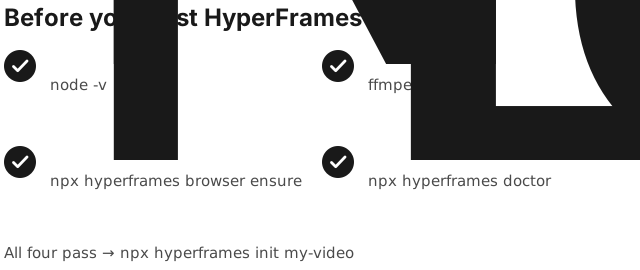
The HyperFrames README lists two system requirements: Node.js 22+ and FFmpeg. The CLI downloads its own headless Chrome for rendering. If you want an AI agent to write the video for you, you also need a coding agent such as Claude Code, Codex, Cursor or Gemini CLI.
node -vshould print v22 or newer.ffmpeg -versionshould print a version, not “command not found”.- Disk space: rendering writes temporary frames, so keep several GB free on the drive that holds your temp folder.
How to install HyperFrames
Pick the path that matches how you plan to make videos. All three use the same open-source engine.
Option A: Claude Code plugin
claude plugin marketplace add heygen-com/hyperframes
claude plugin install hyperframes@hyperframes
Then start with /hyperframes:hyperframes in Claude Code.
Option B: agent skills (Codex, Cursor, Gemini CLI and others)
npx skills add heygen-com/hyperframes   # choose "Core Skills" in the picker
# or, non-interactive, straight from the main branch:
npx hyperframes skills update
Option C: CLI only, no agent
npx hyperframes init my-video
cd my-video
npx hyperframes preview
npx hyperframes render -o out.mp4
The full walkthrough of option C is in our HyperFrames tutorial.
Verify the install
npx hyperframes doctor        # runtime, browser, FFmpeg and other local requirements
npx hyperframes browser ensure  # find or download the Chrome used for rendering
The official troubleshooting guide starts with doctor too. Fix anything it flags before you debug your composition.
Common HyperFrames install errors and fixes
“HyperFrames requires Node.js >= 22”
The CLI exits with this message on older Node versions (we saw it on Node 20 while testing). Install the current Node LTS from nodejs.org, or switch with a version manager, open a new terminal, and confirm with node -v.
“FFmpeg not found”
Install FFmpeg with the command the official docs give for your system, then rerun npx hyperframes doctor:
brew install ffmpeg          # macOS
sudo apt install ffmpeg      # Ubuntu / Debian
# Windows: download a 64-bit build from ffmpeg.org, add its bin folder to PATH
On Windows, one user found doctor reported FFmpeg missing even though ffmpeg ran fine from PowerShell (issue #333, since closed). If that happens, update HyperFrames first, then open a fresh terminal so it picks up the new PATH.
Skills install fails with a git-lfs error or a clone timeout
npx skills add heygen-com/hyperframes clones the repository. People have hit two failures here. One is git-lfs: command not found on machines without Git LFS (issue #407). The other is a 60-second clone timeout, because the repo is large (issue #300). Install Git LFS (brew install git-lfs or sudo apt install git-lfs, then git lfs install) and retry. You can also use npx hyperframes skills update, which the README recommends for agents and non-interactive installs.
Windows: “Ready to render” but no Chrome, or the render seems to hang
On one Windows 10 machine, browser ensure reported success but left no executable, and render then retried for about 20 minutes (issue #5322). The fix shipped: browser ensure now verifies the binary. On an older version, update and force a clean download:
npx hyperframes@latest browser ensure --force
Docker setup takes longer than expected
Docker is optional. It gives you a pinned render environment (npx hyperframes render --docker), but you do not need it for a first video. One user described spending a week on Docker Desktop setup and asked for a click-and-run installer (issue #5504). If --docker will not start, run docker info and confirm the daemon is running.
Can I use HyperFrames without installing anything?
Partly, and it depends on what you want to control:
- HeyGen’s hosted HyperFrames MCP connector (beta) lets Claude or ChatGPT create and render a video in the cloud with your HeyGen account. Nothing is installed locally, but you work by chat rather than with project files (official guide).
- HyperFrames Studio app for Mac and Linux gives you a visual editor and needs a coding agent connected on your computer.
- Html2MP4 (that is us) is building a browser-based way to pick a template, change the text, logo and colors, preview it and download the MP4, with no Node, FFmpeg or CLI. It is in early access: see how it will work.
Installed it and the render is the slow part? Read HyperFrames render slow or stuck: fixes. Comparing tools? See HyperFrames alternatives.